Styling lists
样式化列表
用浏览器开发者工具查看那些列表元素,你会注意到若干个默认的样式预设值:
<ul>和<ol>元素含有16px(1em)的顶部和底部margin和40px(2.5em)的padding-left。- 列表项(
<li>元素)默认是没有设置间距的。 <dl>元素设置含有16px(1em)的顶部和底部margin,但不含内边距。<dd>元素含有40px(2.5em)的margin-left。- 在参考中提到的
<p>元素设置含有16px(1em)的顶部和底部margin——与其他的列表类型相同。
处理列表间距
/* 通用样式 */

html {
  font-family: Helvetica, Arial, sans-serif;
  font-size: 10px;
}

h2 {
  font-size: 2rem;
}

ul,
ol,
dl,
p {
  font-size: 1.5rem;
}

li,
p {
  line-height: 1.5;
}

/* 描述列表样式 */

dd,
dt {
  line-height: 1.5;
}

dt {
  font-weight: bold;
}
列表特定样式
<ul>或<ol>的三个属性:
list-style-type设置用于列表的项目符号的类型,例如无序列表的方形- 或圆形项目符号,或有序列表的数字、字母或罗马数字。list-style-position:设置在每个项目开始之前,项目符号是出现在列表项内,还是出现在其外。list-style-image:允许为项目符号使用自定义图片,而不是简单的方形或圆形。
符号样式
list-style-type - CSS:层叠样式表 | MDN (mozilla.org)
disc,circle,square,decimal,georgian,trad-chinese-informal,kannada,lower-roman,upper-roman.
lower-alpha,lower-latin- : Lowercase ASCII letters
upper-alpha,upper-latin- : Uppercase ASCII letters
项目符号位置
list-style-position可以是inside或者outside.
使用自定义的项目符号图片
ul {
  list-style-image: url(star.svg);
}
然而,这个属性在控制项目符号的位置,大小等方面是有限的。最好使用 background 系列属性。
ul {
  padding-left: 2rem;
  list-style-type: none;
}

ul li {
  padding-left: 2rem;
  background-image: url(star.svg);
  background-position: 0 0;
  background-size: 1.6rem 1.6rem;
  background-repeat: no-repeat;
}

list-style简写
ul {
  list-style-type: square;
  list-style-image: url(example.png);
  list-style-position: inside;
}
可以被如下方式代替:
ul {
  list-style: square url(example.png) inside;
}
属性值可以任意顺序排列,你可以设置一个,两个或者所有三个值(不包括的属性使用的默认值是 disc、none 和 outside),如果指定了 type 和 image,如果由于某种原因导致图像无法加载,则 type 将用作回退。
管理列表计数
start
start 属性允许你从 1 以外的数字开始计数。以下示例:
<ol start="4">
  <li>Toast pita, leave to cool, then slice down the edge.</li>
  <li>
    Fry the halloumi in a shallow, non-stick pan, until browned on both sides.
  </li>
  <li>Wash and chop the salad.</li>
  <li>Fill pita with salad, hummus, and fried halloumi.</li>
</ol>
这样就是从"4"开始计数。
reversed
reversed 属性将使列表反向计数。以下示例:
<ol start="4" reversed>
  <li>Toast pita, leave to cool, then slice down the edge.</li>
  <li>
    Fry the halloumi in a shallow, non-stick pan, until browned on both sides.
  </li>
  <li>Wash and chop the salad.</li>
  <li>Fill pita with salad, hummus, and fried halloumi.</li>
</ol>

备注
如果反向计数的列表项数比 start 属性的值还要多,计数将继续到零并向负数方向增加。
vaule
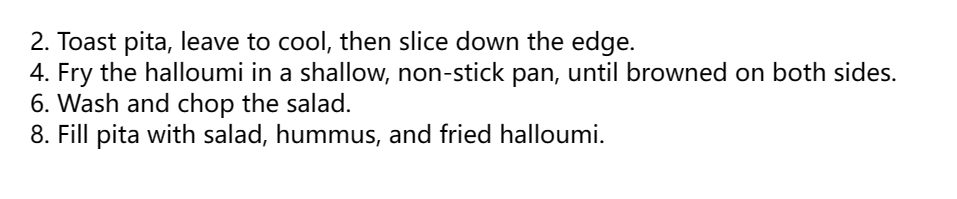
value 属性允许设置列表项指定数值,以下示例:
<ol>
  <li value="2">Toast pita, leave to cool, then slice down the edge.</li>
  <li value="4">
    Fry the halloumi in a shallow, non-stick pan, until browned on both sides.
  </li>
  <li value="6">Wash and chop the salad.</li>
  <li value="8">Fill pita with salad, hummus, and fried halloumi.</li>
</ol>
备注
即使使用非数字的 list-style-type,仍需要在 value 属性中使用等效的数值。